An assistant that can answer questions is useful. An assistant that can also see what’s actually happening in your systems right now, not “as of the last export”, is a different level of useful.
That’s what integrations add to Echo7.
What “integration” actually means here
Echo7 connects to the platforms you already run your business on: ticketing systems, CRM, e-commerce, payment tools, ERP and catalogues. It’s not a rebuild and it’s not a migration. Echo7 sits alongside what you’ve already got and talks to it directly.
Hundreds of integrations are already available, and new ones can be built for your setup, so there’s no fixed list of “supported” systems to check against. If it’s a tool your business relies on and it has an API or MCP server, it’s very likely something Echo7 can be connected to.
No developers required
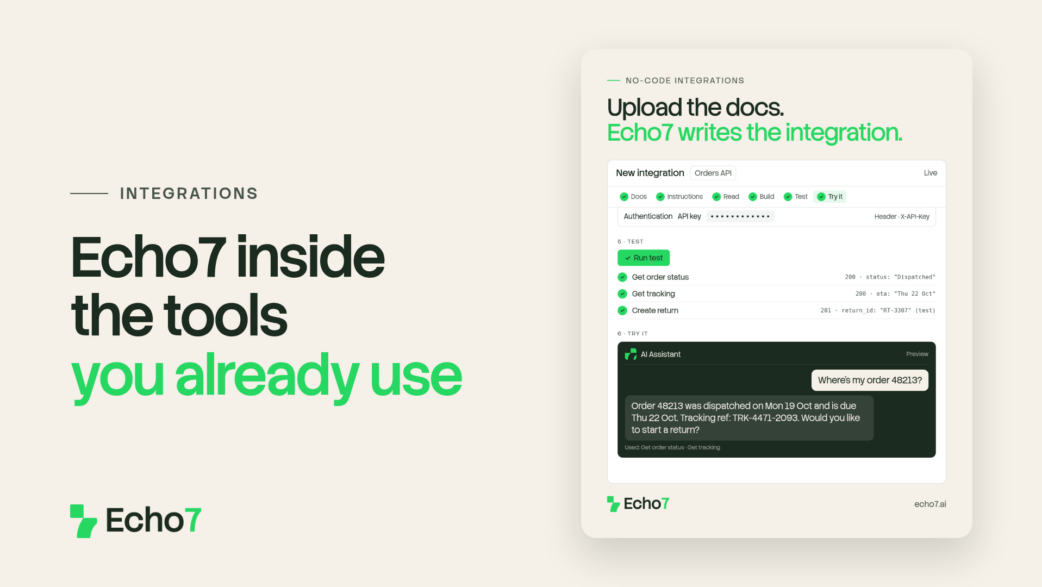
Building an integration doesn’t mean waiting on an engineering team or learning to code. You supply the API or MCP documentation for the system you want to connect, and Echo7 builds the integration for you. Then you describe how it should work, such as what should connect, what data should move and when it should happen, and Echo7 builds the workflow that puts it to work.
That’s true whether it’s a well-known platform or something more niche and specific to how your business runs.
On your website, it can take a customer to checkout, not just describe a product
Most website chat only goes one way. It can tell a customer about a product, then hands them off to go and buy it somewhere else. A connected Echo7 assistant doesn’t have to make that handoff.
A customer can search for what they need, get a recommendation, build a basket and be taken straight to checkout, all from the same conversation. There’s no tab-switching, and no re-explaining what they were just looking at. The conversation carries them all the way to the checkout.
Internally, it means no more “let me just check”
Inside the business, integrations solve a smaller but more constant problem: the mid-conversation pause while someone goes to look something up. What’s the status of this order? Is this account up to date? What’s actually in stock right now?
With a connected system, Echo7 pulls that information live, so you get the real answer at that moment instead of someone switching screens, searching and coming back. The information comes to the conversation, rather than the conversation stopping to go and find it.
Why this matters more than it sounds like it should
A lot of AI tools are impressive right up until someone asks them something that means checking a real system. Then they either guess or stall. Integrations are what stop that from happening. They let Echo7 answer with what’s actually true right now, and act on it, rather than describing what’s probably still accurate.
On their own, integrations connect Echo7 to your systems. Paired with agents, which are next in this series, that connection turns into action: not just looking up an order, but doing something about it, like changing the delivery address or starting a return.
See what Echo7 could connect to
The best way to know what’s possible is to ask about your own setup. Start a free trial and see how Echo7 fits alongside the tools you already run.
Stay in the loop
We’ll be covering agents, workflows and IDP in the posts ahead, along with how all of this can work in different industries.
If you’d rather not keep checking back, sign up to our weekly newsletter. It covers what’s happening in AI more broadly, product updates as we ship them, and the occasional deep dive into how Echo7 works under the hood.