

An enterprise AI assistant is an AI assistant built for organisations: it answers only from approved company content, with controls over who can use it, what it can see and where data is processed.
What makes an AI assistant suitable for enterprise use: a more capable model, or controlled access to the knowledge and systems your organisation relies on? A useful enterprise AI assistant needs more than fluent answers. It needs relevant business context, clear boundaries and a defined role in getting work done.
Consumer AI tools can help with writing and general questions, but they may not reflect your organisation’s documents, processes or governance needs. Before using an assistant for business work, it’s reasonable to ask which information it can access, how it uses that information and where its actions stop. Trust comes from controlling business context, not model capability alone.
This guide explains what enterprise AI assistants can do, where their limits matter and which governance questions to address before deployment. You’ll see how assistants can draw on documents, websites, cloud drives and business systems, then support operational work through connected workflows and agents. We’ll also look at practical controls, including access, deployment choices and how to keep people accountable for AI-assisted actions. The aim is to help you distinguish useful capabilities from broad claims and assess how an assistant can serve customers and staff responsibly.
Key Takeaways
- Assess an enterprise AI assistant by the business knowledge it can use, who it serves and how its use is governed.
- Trace how source content informs responses, and consider how permissions, accuracy and freshness affect usefulness and risk.
- Match assistant capabilities to the job, from finding information to supporting customers, staff or operational actions.
- Set clear expectations for data scope, access and human oversight before choosing cloud or on-premise deployment.
- See how Echo7 can make organisational knowledge available through assistants across websites, WhatsApp, email and API.
Enterprise vs Consumer AI: What’s the Difference?
An enterprise AI assistant is software that uses an organisation’s context to answer questions or support business tasks for its intended users. That context may include internal documents, websites, cloud drives, spreadsheets, databases or other approved sources. Its value comes from applying relevant company information to a defined job, not simply from producing fluent replies.
Consumer AI tools are generally designed for broad, individual use. They can help with writing, research or general questions, but may not have access to a company’s current procedures, product details or internal terminology. An enterprise assistant, by contrast, can be configured around business knowledge and intended users, with access and use shaped by organisational requirements.
Company context can make answers more relevant, but it doesn’t make them automatically correct. Out-of-date or inconsistent source material can lead to unhelpful responses, and an assistant may misunderstand a question. Consider what information it can draw on, whether that information suits the task and how users can recognise when a response needs review.
Governance is part of the distinction. The organisation needs to decide who can use the assistant, which sources are appropriate and what role it plays in a process. If its function extends beyond answering questions, teams should also define which actions it can support and where a person must remain involved. A polished chat window alone doesn’t answer these questions.
What does “enterprise-ready” mean in practice?
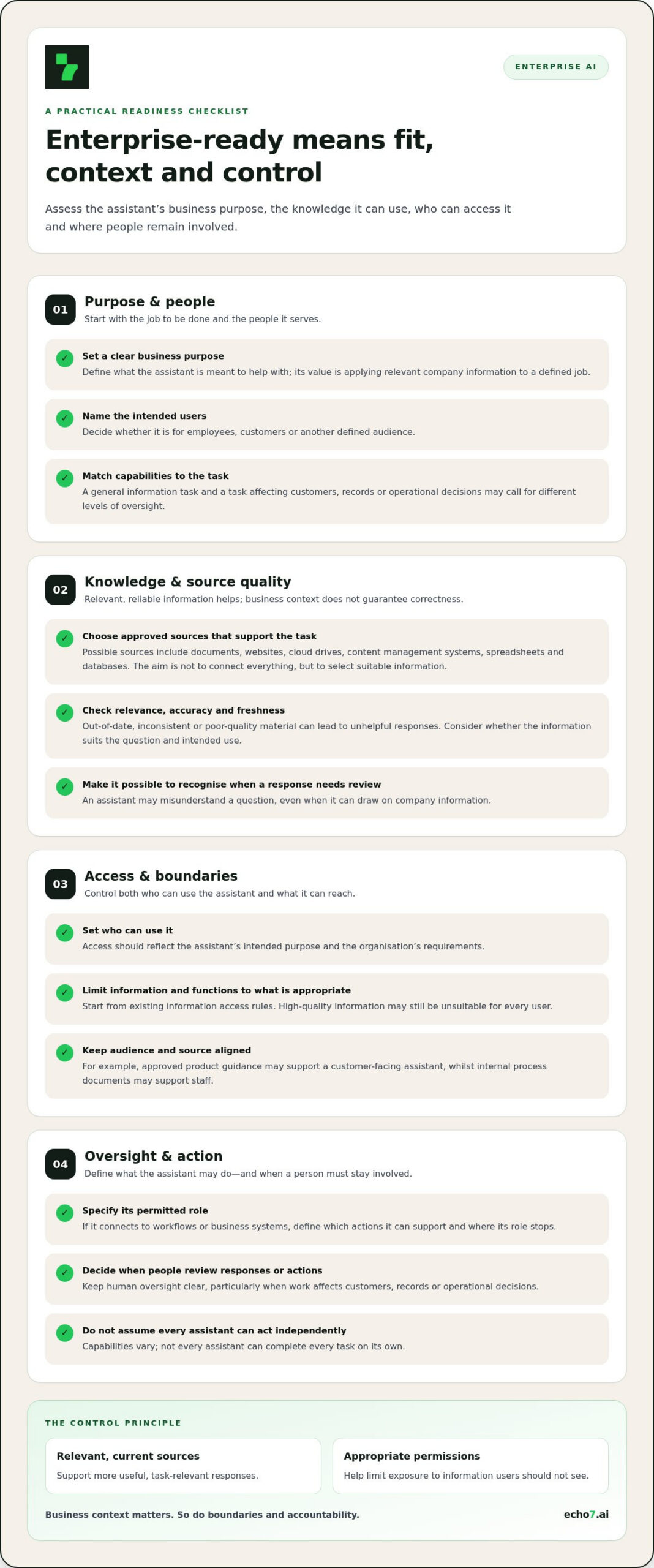
Enterprise readiness is about fit, not a model’s size. It means the assistant has a clear business purpose, uses relevant knowledge and serves the people who need it, such as employees or customers. Its access should reflect that purpose, and its use should sit within the organisation’s governance approach. Suitability depends on the task, the information involved and the controls the organisation needs.
- Knowledge: Identify which business sources inform answers.
- Users: Define who the assistant is intended to support.
- Access: Set boundaries around the information and functions available.
- Oversight: Decide when people should review responses or actions.
These checks help distinguish business readiness from a general-purpose tool presented in a corporate setting. The same assistant may suit a low-risk information task but need closer oversight for work that affects customers, records or operational decisions.
How is an enterprise AI assistant different from a chatbot?
A traditional chatbot often follows scripted question-and-answer paths. It can be effective for predictable enquiries, but may struggle when someone asks something outside its prepared flow. An assistant using business-specific context can draw on relevant organisational material to respond to a wider range of questions. That still doesn’t guarantee accuracy; the quality and relevance of its sources matter.
Some assistants can also connect responses to workflows or business systems. For example, an assistant might provide information and, where configured, support a related operational step. The term AI agent is useful for understanding systems that can act towards a goal, but capabilities vary. Not every assistant can complete every task independently, so organisations should define its permitted role and the human oversight required.
How an Enterprise AI Assistant Uses Business Knowledge Responsibly
An enterprise AI assistant is useful only when its business context is relevant and its access is controlled. The process can be understood without assuming a particular technical architecture: an organisation selects suitable source content, sets who can use it and makes that material available to support responses. A person asks a question, and the assistant uses accessible information to formulate an answer. The result still depends on the quality and relevance of the source material.
Source quality and access controls shape business AI answers: current, reliable information supports relevance, whilst appropriate permissions limit exposure. Consider these controls together. Broad access to poor or obsolete material can produce unhelpful responses, while high-quality information may still be unsuitable for every user if it contains content they shouldn’t see.
Which business knowledge sources can an assistant use?
Depending on the platform and organisation, sources may include documents, websites, cloud drives, content management systems, spreadsheets and databases. The useful question is not whether an assistant can reach every system, but which approved sources support the task. For an internal policy assistant, for example, current procedures may matter more than a broad collection of unrelated files.
Echo7 assistants can use proprietary knowledge from documents, websites, cloud drives, CMS platforms, spreadsheets and databases. An organisation might make approved product guidance available to a customer-facing assistant, whilst using internal process documents to support staff. These examples show how source selection can reflect the intended audience and purpose.
Why permissions and source upkeep matter
Start from the organisation’s existing information access rules. Decide which content is suitable for the assistant’s audience, then apply access boundaries that reflect that decision. A staff assistant and a public-facing assistant may need different source scopes. Just as importantly, access to information is not the same as permission to take action in a connected system. Reading a procedure doesn’t automatically authorise an assistant to update a record or trigger a workflow.
Source upkeep matters just as much. Conflicting versions of a policy, expired product details or incomplete records can weaken answers, even when the assistant can access them. Assign responsibility for maintaining key sources, remove superseded material where appropriate and test common questions against the content users will rely on. Keep a person involved where an answer could affect a consequential decision.
For a wider framework on governance and risk mitigation, see Hexaware’s Responsible AI Implementation Best Practices. As a practical check, compare answers to common questions with the relevant source material, especially before relying on them for important work. Organisations considering a no-code assistant and workflow platform can use these questions to connect business knowledge with a clearly defined purpose.
Which Enterprise AI Assistant Capabilities Fit Different Business Needs?
Start with the work to be done, not the longest feature list. An enterprise AI assistant might help staff find internal guidance, support customers with common questions or connect a conversation to an operational process. These are different needs. The right capability depends on who needs help, where they work and whether the assistant should provide information or support an action.
| Business need | Assistant role | Users | Relevant channel |
|---|---|---|---|
| Find approved internal information | Retrieve and explain relevant knowledge | Staff | Internal website or API-connected experience |
| Respond to common service questions | Provide customer-facing information | Customers | Website, WhatsApp or email |
| Support a defined operational step | Pass a request into a connected system or workflow | Staff or customers, depending on the process | Website, WhatsApp, email or API |
The channels in this table are examples, not interchangeable choices. Echo7 supports deployment through websites, WhatsApp, email and custom APIs. A website may suit customers looking for help whilst browsing; WhatsApp or email may fit an existing service conversation; an API can connect an assistant with another application. Staff knowledge support may call for a channel that fits their established work, rather than a public-facing interface.
Match the assistant to its users and channels
Define the audience first. Staff may need answers drawn from internal procedures, whilst customers need information approved for external use. Then choose a channel that makes access straightforward without widening access to inappropriate content. Keep the intended audience, source material and interaction channel aligned. A channel choice doesn’t determine what the assistant should be allowed to answer.
When should an assistant answer, act or hand over?
Separate three levels of support. An information request, such as asking where to find a policy or what a published service includes, is answer-led. A connected action goes further. If integrations and permissions are configured for it, an assistant might check an order or raise a support ticket. Those tasks require access to the relevant business system; access to knowledge alone doesn’t provide permission to act.
Some requests should go to a person. A complex case, missing information or a decision outside the assistant’s defined role may call for human review. Set that boundary as part of the use case, rather than treating every conversation as a task the assistant must finish.
Workflows can connect information and actions into a defined sequence, but each step still needs a clear purpose and appropriate permissions. Map the process at a high level: what starts it, what the assistant supports and where a person reviews or takes over. This helps teams extend support without assuming the assistant can resolve every request independently.
How Should Enterprises Assess AI Assistant Security and Control?
Assess the assistant as part of a business process, not as a standalone chat interface. A practical review moves from the information it handles to the actions it may support, then defines where people stay accountable. Work through these decisions before deployment:
- Define data scope. Identify the information the assistant needs, its sensitivity and which sources are approved. Limit the scope to what supports the intended use.
- Set access boundaries. Decide who can use the assistant and what information or connected systems are available to each audience. Separate permission to retrieve information from permission to take action.
- Choose deployment needs. Compare cloud and on-premise options against your organisation’s infrastructure, data handling and operational requirements.
- Assign oversight. Name the teams responsible for source upkeep and governance. Set clear points for human review, such as requests involving sensitive information, uncertain answers or consequential decisions.
What should governance cover before deployment?
Make ownership explicit. Information owners can identify which content is current and approved; security and business teams can define access and appropriate use. Consider what happens when information changes, a user’s role changes or the assistant can’t provide a dependable response. Those decisions make controls operational rather than aspirational.
Set review criteria around the consequences of an answer. A general internal knowledge request may need a different level of oversight from guidance that could affect a customer or business decision. Teams should also establish a simple way for users to flag questionable answers and for owners to review the underlying source. As part of deployment, test representative questions against approved company documents and record where responses need review.
Standards and regulations help frame the review, but they aren’t blanket assurances. Echo7’s platform is designed around SOC 2 and GDPR benchmarks. That describes design considerations, not a claim that a particular deployment is certified or automatically compliant. SOC 2 and GDPR have distinct purposes; organisations still need to assess their own systems, data use and responsibilities in context.
When might on-premise deployment matter?
On-premise deployment can be relevant where an organisation needs greater control over its local infrastructure or has data sovereignty requirements. Weigh it against cloud deployment in light of the organisation’s architecture, operating model and governance needs. Echo7 supports both cloud and on-premise deployment, allowing the choice to be considered alongside the intended use.
Location alone doesn’t guarantee security or compliance. Access controls, source governance, oversight and day-to-day operational practices remain important in either model. Define the requirements first, then assess how the deployment option fits them.
To explore how these control questions relate to a no-code assistant and workflow platform, explore Echo7’s enterprise AI approach.
How Echo7 Connects Enterprise Knowledge to Useful AI Support
Once an organisation has defined its users, approved information and control requirements, the next step is to choose a focused use case. Echo7’s no-code assistant and workflow platform makes proprietary business knowledge available to customers and staff, then connects suitable interactions to operational work. Start with one clear need, such as helping users find reliable answers from approved company content. Expand when the purpose, sources and boundaries are understood.
From business knowledge to assistant interactions
Echo7 assistants can use business knowledge from documents, websites, cloud drives, content management systems, spreadsheets and databases. Teams can configure an assistant around the information relevant to its audience, rather than relying only on general-purpose knowledge. The source set and intended use should work together: staff support and customer service may draw on different material and need different access boundaries.
That knowledge can be made available through a website, WhatsApp, email or a custom API. A website assistant can support visitors seeking information; WhatsApp or email can bring assistance into familiar customer or staff conversations; an API can connect an assistant with another application. These are deployment options, not a requirement to use every channel. Choose the one that fits the audience and the job.
No-code configuration gives teams a practical way to shape an assistant around a defined purpose without making the chat interface the whole solution. Source selection, ownership and upkeep remain important: the assistant is only as useful as the business information it can draw on. Include source checks in implementation planning, and establish how people can flag answers that need attention.
From assistant responses to connected processes
An answer can be the endpoint, or it can form one part of a broader process. Echo7 also supports connected operational agents and workflows, which can link assistant interactions with business systems where the use case and permissions allow. Define the action, the relevant system and the point for human oversight. A conversation should not be treated as authority to carry out every possible task.
For a first deployment, map the path from a user request to the intended outcome. Decide what information the assistant needs, what a connected agent or workflow is meant to do, and where a person should review or take over. This keeps the scope practical and makes it easier to assess whether the assistant is helping with real work, rather than merely adding another place to ask questions.
Document processing is a separate capability, not simply another chatbot response. Echo7’s Intelligent Document Processing extracts and validates data from invoices, forms and PDFs. Organisations can use it where document data needs to feed into a business process, with validation supporting the handling of extracted information.
If this approach fits your organisation’s needs, Explore Echo7 and consider which knowledge-led use case is ready to put into practice.
Turn a Clear Use Case into Your Next Step
The next move is not to automate everything. Choose one recurring point of friction where better access to trusted information could help customers or staff, then define what a useful result looks like and who remains responsible for it. That gives your enterprise AI assistant a practical starting point, with room to expand as the use case and controls mature.
Echo7 brings this approach into a no-code platform: assistants can be trained on proprietary business knowledge, with cloud and on-premise deployment options to suit different organisational needs. For document-heavy processes, Intelligent Document Processing can extract and validate data from invoices, forms and PDFs. These capabilities can support a wider operational approach, while keeping the first step focused on a real business need.
Set a clear purpose, choose the knowledge and process that fit, and build from there. Explore Echo7’s enterprise AI assistant to see how it could support your organisation’s next practical step. Progress starts with a defined use case and the confidence to put it to work.
Frequently Asked Questions
Can an enterprise AI assistant support more than one language?
Yes. Echo7 assistants support multilingual interactions with customers and staff. For a consistent experience, review whether key business terms, product names and policy wording are clear across the languages your organisation uses. Make sure the relevant source information is available and current, too. Multilingual support can make assistance more accessible, but it doesn’t replace checking that responses reflect your organisation’s approved guidance.
Do employees need coding skills to use a no-code enterprise AI assistant?
No. Employees can use an assistant through everyday questions and requests without writing code. No-code configuration also makes it practical for teams to shape an assistant around a business purpose. Connecting systems or planning a deployment may still call for technical input, particularly where existing processes and access rules need to be considered. Separate the people who use the assistant from those responsible for configuring and governing it.
Can an enterprise AI assistant connect to existing business systems?
Yes, an assistant can connect with business systems through integrations and agents. For example, an agent could check an order status, schedule an appointment or manage a support ticket. These actions require an appropriate connection and defined permissions. Start with one process, identify the system involved and decide which steps the assistant can support and which need staff involvement.
What happens when an enterprise AI assistant cannot answer a request?
A well-planned assistant should have a route for requests it can’t handle, rather than guessing or forcing an answer. It can direct a complex case to a member of staff, with the conversation context available to support the handover where the process allows. Teams should define what triggers escalation, such as missing details, an unusual request or a decision outside the assistant’s role.
Can an enterprise AI assistant process invoices and other business documents?
Yes, but document processing is a distinct capability from answering questions in a chat. Echo7’s Intelligent Document Processing extracts and validates data from invoices, forms and PDFs. For example, a team could use it to capture information from incoming documents and pass it into a connected business workflow. The organisation should determine how extracted data is reviewed and handled within its existing process.
Is an on-premise enterprise AI assistant suitable for every organisation?
No. On-premise deployment may suit organisations that need local infrastructure control, but it isn’t automatically the right fit for every operating model. Consider your data requirements alongside the internal capability needed to run and govern the deployment. Cloud may better suit other requirements. The choice depends on how the organisation manages infrastructure, information access and ongoing oversight, not on deployment location alone.
Does an enterprise AI assistant replace employees?
No. An assistant can support routine information requests and defined operational steps, but people remain important for judgement, complex cases and work that needs human understanding. For instance, staff can handle an exception that falls outside a ticket workflow or review a request that needs a decision. Design the assistant to support employees’ work, with clear escalation paths and accountability for outcomes.