

An AI assistant for business is software that answers customers’ and employees’ questions from the company’s own information and can move routine work forward through connected systems.
What if an AI assistant could answer routine questions and move work forward, while staying within clear business rules? That’s the practical test behind an AI assistant for business. It’s reasonable to ask whether its answers will be accurate, whether it can access current company information and where a chatbot ends and a more capable assistant begins.
The difference is not just how an AI tool responds. It’s the business knowledge it can use, the systems it connects to, the actions it’s permitted to take and when it hands a task to a person. Without those boundaries, speed alone is not a reliable measure of value.
This guide explains how to identify repeatable tasks an assistant can support, assess whether its answers are grounded in trusted information, and consider data access, security and human oversight. You’ll also learn how integrations and workflows can turn useful answers into action, how to measure performance and how to introduce an assistant responsibly. The aim is to find a valuable use case, set clear limits and build confidence through careful evaluation.
Key Takeaways
- See how an AI assistant for business differs from a general text-generation tool by using organisational knowledge to support practical tasks.
- Learn how information sources, access permissions and freshness shape the usefulness of answers.
- Use a focused checklist to assess source quality, permission boundaries, testing and escalation.
- Compare potential use cases by who needs the information, what action follows and what an error could mean.
- Follow a practical introduction sequence, from selecting a use case to testing, launch and ongoing improvement.
What is an AI assistant for business, and what can it do?
An AI assistant for business is software that uses artificial intelligence to respond to questions and requests, helping people find information or complete routine work. Depending on its setup, it can draw on approved company knowledge, connect with business systems or trigger a defined workflow. Its purpose is practical: make useful information and support easier to access, while keeping people and established processes accountable.
A general AI tool can generate text or ideas in response to a broad prompt. A business assistant can use relevant organisational information, such as product guidance, internal procedures or service details. That context can make a response more useful to an employee or customer. But access and capabilities depend on the assistant’s configuration: not every tool can use company data or take action in connected systems.
A scripted chatbot follows pre-written paths; an AI assistant can interpret a question and respond using the information and tools made available to it. That flexibility still has limits. Answers depend on the assistant’s sources and configuration, and actions should stay within defined permissions. Some assistants can also use agent-like capabilities to carry out steps towards a goal. The broader concept of an AI agent includes systems that act with varying degrees of autonomy.
How is a business AI assistant different from a general AI tool?
A general-purpose tool is suited to open-ended requests, such as drafting an email or summarising text a user provides. A business assistant can respond in the context of company information when that information has been connected and made available. For example, an employee asking about a returns process could receive guidance based on the organisation’s procedure rather than a generic answer. Context can improve relevance, but it does not automatically make an answer current or correct.
The distinction is not simply “AI versus chatbot”. It’s whether the assistant can use the right business knowledge for the right audience within the right boundaries. A staff-facing assistant might use internal documents, while a customer-facing one may be limited to approved service information. The scope depends on which sources and permissions are configured for that use.
What types of work can an AI assistant support?
Start with tasks that involve finding, explaining or routing information. An assistant might help a staff member locate a policy, answer a customer’s common question or summarise a business document. With suitable integrations, workflows and controls, it can also support routine actions, such as checking an order, booking an appointment or raising a support ticket.
- Retrieve: Find relevant information in connected documents or other approved sources.
- Respond: Give staff or customers an answer based on the available business context.
- Support a task: Pass information into a configured workflow or connected system, where permitted.
These are different levels of capability, not features to assume are present in every assistant. Begin with a clear process. Decide what the assistant may answer, what it may change and when a person should take over. Used this way, an AI assistant supports established work without replacing the people accountable for it.
How does an AI assistant for business use company knowledge?
A business assistant turns organisational information into responses by matching a user’s question with relevant material it can access. It uses that context to form an answer, such as explaining a policy or summarising a product detail. The result depends on more than the AI model: source quality, access permissions and how recently information was updated all affect what the assistant can provide.
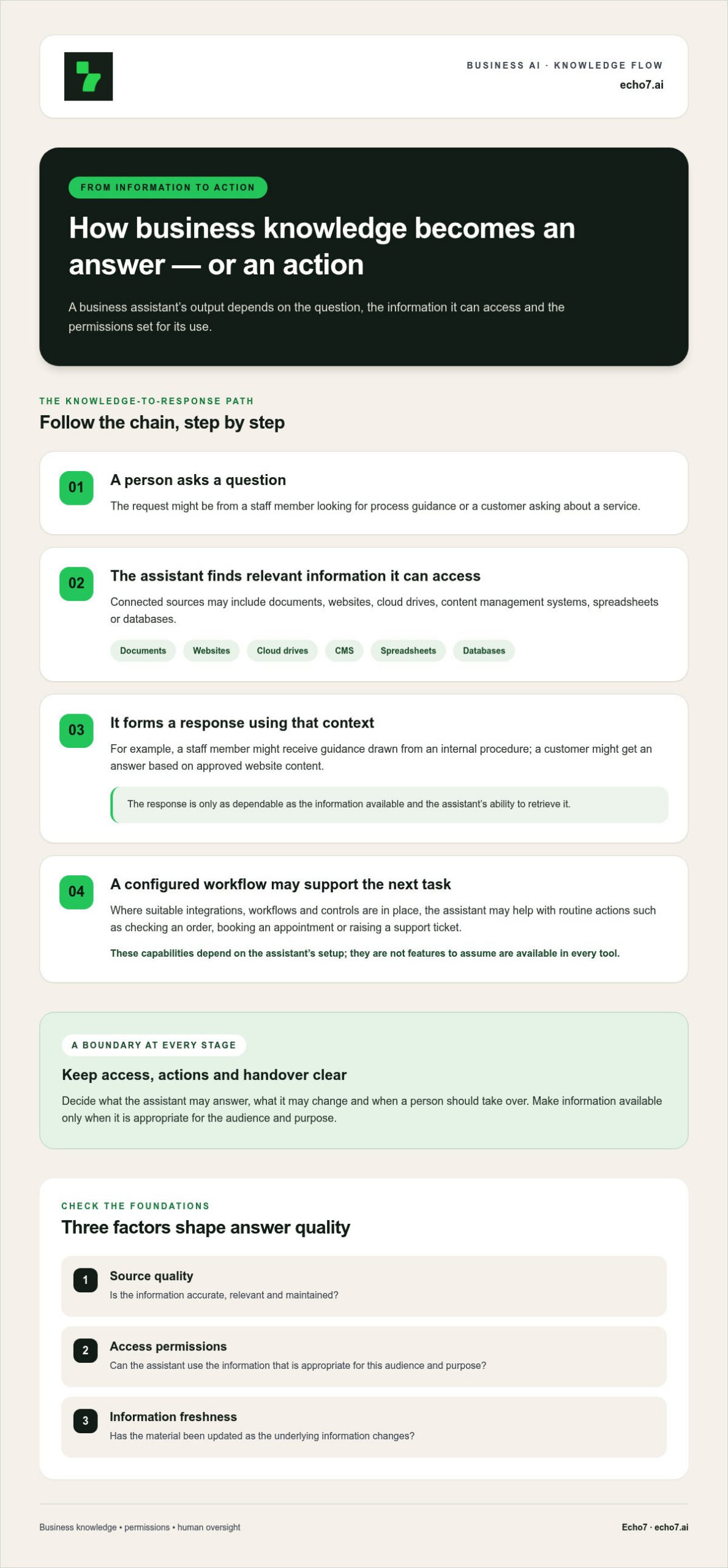
Think of the process as a chain. A person asks a question, the assistant retrieves relevant information it can access, then it forms a response using that material. If the source is incomplete, outdated or outside the user’s permitted access, the answer may be less useful. Connecting AI to business information therefore requires clear decisions about data governance and purpose, as the IBM Research discussion of AI strategy also emphasises.
Which business information can an assistant use?
Depending on its connections and configuration, an AI assistant for business can draw on documents, websites, cloud drives, content management systems (CMS), spreadsheets and databases. These sources differ in structure and update frequency. A database may hold changing operational records; a procedure document may describe an approved process; a website may contain public-facing service information. Each is useful only when its information is accurate, relevant and maintained.
Access matters just as much. An assistant should use only information that is appropriate for its audience and purpose. Staff and customers may need different answers, and teams may have different responsibilities for sensitive material. Set access in line with the organisation’s permissions rather than making every connected source available to every user.
How does information become a useful answer or action?
When a question arrives, the assistant identifies relevant information it can access and uses that context to form a response. A staff member asking about a process might receive guidance drawn from an internal procedure. A customer asking about a service could receive an answer based on approved website content. The response is only as dependable as the information and the assistant’s ability to retrieve it.
Integrations matter when a task needs current operational information. A static document may explain how order updates work, but checking a particular order’s status requires access to a system holding its current details. The assistant can retrieve information from a connected system, subject to its permissions and configuration.
An answer provides information; an automated action changes or triggers something in a connected system. Explaining how to raise a ticket is different from creating one. Actions need a suitable integration and a configured workflow, with controls that define what the assistant can do and when a person should review or take over.
Keep the design grounded in a defined business purpose: connect relevant sources, respect existing access boundaries and decide whether the assistant should only answer or also initiate a task. Echo7’s no-code business AI assistant platform connects organisational knowledge with user interactions and operational workflows.
How can a business make an AI assistant reliable and safe?
A fluent answer can still be wrong, incomplete or out of date. Treat reliability as something to test and manage, not something guaranteed by confident wording. An AI assistant for business should use suitable information, respect access boundaries and make clear when it cannot answer reliably. For tasks with higher consequences, keep a person responsible for review and decisions.
Use this checklist to establish the basics:
- Check source quality: Use relevant, maintained business information, and assign responsibility for keeping it accurate.
- Set permission boundaries: Limit what the assistant and each user can access to what they need for the task.
- Test before wider use: Compare responses with approved information, including questions that are ambiguous or outside the assistant’s scope.
- Define escalation: Specify when the assistant should ask for clarification, decline to answer or hand a request to a person.
How should teams test answer quality?
Build a test set from real, common questions and edge cases. Include a request with missing details, a question whose answer is not in the approved material and one that could be misunderstood. Check each response for correctness, relevance and consistency with its source. Also assess whether the assistant acknowledges uncertainty instead of filling gaps with a plausible-sounding answer. Record failures and use them to improve the knowledge, configuration or process.
Repeat tests when source material, permissions or workflows change. An answer that matched yesterday’s guidance may no longer be suitable after a procedure is updated. Retesting helps teams catch changes before they affect routine use. Keep examples of expected answers so reviewers can assess consistency, not just whether a response sounds reasonable.
What safeguards belong around business data and decisions?
Map who may access each information source and which connected systems the assistant can use. Then set boundaries for its actions. It might provide general guidance directly, while a task that changes a record, affects a customer or depends on judgement requires approval or escalation. Make ownership clear: people should know who reviews exceptions, maintains the knowledge and responds when something goes wrong.
Assess deployment and data-handling choices against your organisation’s governance needs, including where the assistant runs and how its connections are managed. Echo7 supports cloud and on-premise deployment, and its platform is designed to align with SOC 2 and GDPR standards. Alignment is not the same as certification. Evaluate the arrangement against your own requirements, particularly before connecting sensitive information or enabling operational actions.
Safeguards still matter after launch. Track recurring errors, unanswered questions and handovers, then use those signals to refine sources and boundaries. Keep human review where the consequences of an incorrect answer or action call for it. This lets an assistant handle appropriate routine work while preserving accountability for decisions that need human judgement.
Where can an AI assistant for business deliver measurable value?
Start with a repeatable task, not a broad ambition to “use AI”. Map who needs help, what information they need, whether the assistant should answer or take action, and what an error could affect. This makes it easier to compare straightforward information support with workflows that change records or trigger follow-up. It also helps you set the right level of human oversight before a task goes live.
Which use cases are a sensible starting point?
Look for frequent questions with answers in approved business sources, or routine processes with clear inputs and observable outcomes. Choose work where the team can judge whether the result is correct. If a task depends on current operational records, the necessary system integration must be in place. Otherwise, keep the assistant to guidance or information retrieval.
- Staff policy questions: Staff need approved procedures, and the assistant retrieves guidance. Risk is lower when it only provides information, with a clear route to a manager if the answer is uncertain.
- Customer service enquiries: Customers need service information or an update. The assistant can answer from approved content or retrieve current details through an integration. Review responses and escalate exceptions to staff.
- Appointment requests: Customers need an available time. The assistant can check a connected system and submit a booking through a configured workflow. Human review may be appropriate if details are incomplete or the booking has important consequences.
- Support tickets: A customer or employee needs an issue logged. The assistant can create and route a ticket. Monitor for missing details, incorrect categorisation and cases that need prompt staff attention.
These examples show a useful distinction: answering a question usually carries a different risk from changing a record or initiating follow-up. An AI assistant for business should have narrower permissions and clearer review points as the consequences of an error increase. Prioritise processes with defined steps, reliable information and a clear way to check completion.
How should teams measure business impact?
Set a baseline before launch. Record enquiry volume, current handling time, completion rates and quality for the selected task. Then track the same measures during use, alongside unresolved questions, incorrect responses and handovers to staff. Compare like with like, taking account of periods or request types that may affect workload.
Speed only counts as progress when the answer is useful and the task is completed correctly. Shorter response times, for example, may not be a genuine improvement if more customers need to contact the team again. Review feedback and exceptions with the people who own the process, then adjust the assistant’s scope or workflow where needed.
Ready to connect a practical use case to an operational workflow? Explore Echo7’s business AI assistant and how it can support staff and customer tasks.
How should a business introduce an AI assistant?
Start with one defined job, then expand only when the assistant performs reliably within agreed boundaries. This keeps the rollout focused on a business outcome rather than technology for its own sake. Introduce an AI assistant for business in stages: choose a use case, set its scope, prepare the knowledge it needs, test realistic interactions, launch to a defined audience and improve based on results.
- Choose a task: Select a repeated process with a clear audience and outcome, such as answering a common staff question.
- Set boundaries: Decide what the assistant can answer, what it may do, what information it can access and when a person must take over.
- Prepare knowledge: Identify the approved sources and the people responsible for keeping them accurate.
- Test and launch: Check representative questions and exceptions before opening access to the intended users.
- Review and improve: Use answer quality, completion and escalation patterns to guide changes.
No-code configuration can reduce reliance on specialist development when setting up an assistant and its workflows. It does not remove the need for clear ownership, suitable integrations or technical input where a process requires it. Keep the first scope manageable, and involve the people responsible for its information and outcomes from the outset.
What should a first assistant pilot include?
Define one task, its audience, the approved information source and a measure of success. Assign owners for content quality, access, response review and issue escalation. Before launch, test realistic questions, including incomplete requests and cases the assistant should not handle. Start with a limited group or channel, review the results and resolve gaps before extending access or adding actions.
How can an assistant grow beyond the pilot?
Use pilot results and user feedback to decide what to improve next. Add knowledge sources or workflows only when they serve a clear need and the related permissions and review points are understood. Then choose suitable interaction channels, such as a website, WhatsApp, email or API, based on where users need support. Expand in steps rather than all at once.
Match the platform to the task you’ve defined. Echo7’s no-code assistant connects organisational knowledge with user interactions. Its workflow and agent capabilities can support operational actions, while Intelligent Document Processing extracts and validates information from invoices, forms and PDFs. Cloud and on-premise deployment options offer different approaches to deployment. These capabilities are most useful when selected to meet a specific process, integration and governance need, rather than added without a clear purpose.
Keep the rollout accountable as it grows. Review unanswered questions, incorrect responses, user feedback and handovers, then adjust the assistant’s scope, information or workflow. Explore Echo7’s business AI assistant platform to see how no-code assistants, workflows and integrations can support a staged introduction.
Turn one clear use case into your next step
The best next move is not to automate everything. Choose one task worth improving, give it a clear owner and decide what a good outcome looks like before introducing an assistant. That creates a practical starting point for an AI assistant for business, with room to learn from real use before expanding its role.
As your understanding grows, decide whether to extend the assistant to another team, channel or workflow. Keep the focus on accountable ownership and measurable results. Progress comes from making each step useful, not from adding complexity for its own sake.
Echo7 brings business knowledge, assistants and operational capabilities together, with options to fit different working environments. Explore Echo7’s AI assistant for business and identify a practical place to begin.
Start with one well-chosen task. Build from what works.
Frequently Asked Questions
Can an AI assistant work with a business’s own information?
Yes, if the assistant can access relevant business sources and permissions are configured appropriately. For example, a team could use an approved internal procedure to answer staff questions. Before relying on the answers, check whether the source is current and whether the assistant can retrieve the right detail. Test questions staff actually ask, including cases where information is missing, and make sure access reflects who is responsible for each type of data.
Is an AI assistant for business the same as a chatbot?
Not necessarily. A scripted chatbot usually follows predefined conversation paths, whilst an AI assistant can interpret a wider range of questions and respond using information available to it. Some assistants can also connect to business systems to support tasks. The label alone does not tell you what a tool can do. Compare its access to business knowledge, permitted actions, response to uncertainty and handover process with the needs of the task you want to support.
Can a business AI assistant support more than one language?
Yes. Echo7 supports multilingual assistants, which can help teams serve customers or colleagues who communicate in different languages. Test each language separately rather than assuming a strong response in one will translate accurately into another. Include local terminology, common ways of phrasing requests and realistic examples from the relevant service or process. For technical or customer-facing answers, have someone familiar with that language review accuracy, tone and important distinctions.
Does an AI assistant replace employees?
No, not by default. An assistant can handle defined, repeatable information tasks or support a workflow, while people remain responsible for judgement, exceptions and sensitive conversations. For example, it might help route a routine request, but a colleague may need to handle a complaint requiring discretion. Set expectations with staff, clarify who owns escalated cases and make sure users know how to reach a person when their situation falls outside the assistant’s remit.
How much does an AI assistant for business cost?
There is no single price that applies to every organisation. The total depends on the scope of the assistant, its deployment, usage, integrations and implementation requirements. To compare options meaningfully, first define the task, who will use the assistant and which systems it needs to work with. Then consider the full cost alongside outcomes you can measure, such as process completion, service quality and the time people spend handling the task.
Can an AI assistant take actions in business systems?
Yes, when it’s connected to the relevant system and configured with permission to perform specific actions. For example, it could submit a support request using details provided by a user. Set safeguards before enabling actions: decide which steps need approval, what happens if required information is missing and who handles failures. For changes that are difficult to reverse or could affect a customer, use a clear review step before the action is completed.
Is cloud or on-premise deployment better for a business AI assistant?
The right deployment depends on your organisation’s infrastructure, data governance and operational requirements. An on-premise option may suit organisations that need greater control over local infrastructure; a cloud option may fit different integration and operating needs. Compare how each approach affects data access, system connections, maintenance responsibilities and security governance. Echo7 supports cloud and on-premise deployment, so you can assess the options against the environment and controls your organisation needs.